PC Pro: News: Google debuts website creation tool
Another exciting development from Google, to add to their long list of beta-and-never-released products :)
It allows 100MB of space, permitting the uploading of files (via your browser, not FTP). Page publication is 100% instant, the page editor works extremely well, and is all using javascript.
Saturday, February 25, 2006
Google Page Creator
Windows XP: Kernel Improvements Create a More Robust, Powerful, and Scalable OS -- MSDN Magazine, December 2001
Windows XP: Kernel Improvements Create a More Robust, Powerful, and Scalable OS -- MSDN Magazine, December 2001
Well, I enjoyed reading it ^^
It is often hard, at first sight, to find the technical details of Windows, but you soon find that from version to version, it is undergoing major changes (don't tell me about Vista...)
Friday, February 24, 2006
Thursday, February 23, 2006
Macworld UK - Safari struck by Zip security warning
Macworld UK - Safari struck by Zip security warning
The end of the road for the 'secure' Apple Mac?
Monday, February 20, 2006
The merits of open-source?
redhat.com | Open source development: The diversocracy
Questioning open-source as a philosophy. I'd never question it's practicality...
Fast string search
Fast string search
I was looking for a fast algorithm to search for words within a string, I found this.
Let no-one again argue that Java/.NET is as fast as beloved C :-)
Tuesday, February 07, 2006
About Gmail
About Gmail Chat
Google have begun the rollout of a new service to Gmail users. It allows access to Google Talk from within your web browser, through the Gmail inbox page.
At a glance it shows you the status of the people on your contact list, and allows you to talk to them without needed to download/run Google Talk's client.
Let's wait and see what comes of it...
Tuesday, January 31, 2006
BetaNews | IE7 Beta Breaks Instant Messaging Apps
BetaNews | IE7 Beta Breaks Instant Messaging Apps
Hehe. Though seriously, even Miranda seems affected...
http://forums.miranda-im.org/showthread.php?t=3741
Tuesday, January 17, 2006
Google opens up their Talk servers
After long anticipation in the Jabber community Google have finally turned on server-to-server communication (Usually known as s2s). This means that users on servers other than the Google Talk server can now excange messages with each other.
Official Google Talk blog: XMPP Federation (a technical term for s2s ;))
Some Jabber clients are also working on support for Jingle, the standard that the Google Talk client uses for audio (soon video).
Some Jabber servers are showing problems with s2s communication with the GT server, apparably those running jabberd 1.4 (not the CVS version that jabber.org uses). ejabberd works fine.
--Added--
It also seems that MUC support is patchy, but possible (not in official client of course). Again it depends on the server.
Friday, January 13, 2006
Recommended software
Wow, 6 months since my last post. Better be getting on with it...
I've decided to post a list of my tried and tested, and recommended applications for your PC (Windows ;) ). Believe me, I've been through a lot!
The key things I judge software on is size, speed, tidyness (does not make a mess of your PC, leaving unnecessary files everywhere), and is easy to use, and gets the job done.
I have singled out one or two pieces of software for almost any task you will need to do. All are *free*, and where possible, open-source.
Audio Tools
Audacity
Audacity is quite simply one of the best (free, open source) audio editors around. It supports MP3, OGG, as well as standard uncompressed WAV formats. It is extendable with plugins of various sorts, which are linked to from the project's website. [The currently available beta version is a bit buggy, so treat with care, and save regularly.]
CDex
The best tool for converting your precious CDs into digital audio files (MP3 or OGG and more). Development has not been active on the project or several years, but the last release still works perfectly. I couldn't live without it. :-)
HarddiskOgg
This excellent utility records audio as heard through your speaker. It is therefore possible to record all manner of audio streams, the output of music players etc. straight to Ogg (and MP3 of course). It supports timed recording, normalization, yet is small and simple to use.
Instant Messaging
Miranda IM
Miranda IM beats the competition hands down for fitting the criteria I listed at the top of this post. It is a multi-protocol instant messenger, built on the idea of modules called plugins. It is easy to make Miranda do everything, or nothing, depending on which you prefer. The testing builds at the Development Blog are well worth a try, since a lot of progress has been made since the last full release. Download size is ~1 MB.
Trillian
If Miranda is not for you (I admit, it can be a test for new users sometimes), then Trillian will do. It is not small and fast, but it does the job well, easily, and is also extendable with plugins.
Media Playing
Winamp 2.9
Yep, you read correctly. I recommend the 2.9 version, as it fits my criteria listed. The latest version is 5, which adds a lot of features I know I will never want in a music player (v5 can play video amongst other enhancements). V2.9 however, just before the v3 release, is small, fast, and uncluttered. It is skinnable, with .wsz skins, not the new v3+ format (The old format skins are still in abundance, just make sure the skin ends in .wsz. Two skins I recommend (sorry, I hate the default one... :-) ):
SumeAmp and
CleanAMP.
Photo Management
Canon ZoomBrowser Ex
Ok ok, it only comes with Canon cameras, but I just had to congratulate it for it's ease of use, and intuitiveness. If only more programs were so simple... :-)
Picasa
If you don't have a Canon camera, Picasa is surely the best alternative you will find. It allows extensive scanning of your hard disk to recover those pictures you even forgot you had! It allows filters, special effects, and photo restoration from within it's built-in editor. An essential to anyone with a digital camera.
Image Editing
The GIMP
An open-source image editor that easily rivals the leading retail software on the market. All manner of image editing tasks are possible, from photo retouching, to creating works of art on your PC! It can read practically every format of image file you will ever recieve.
I must confess that this program is not small, and older computers may struggle a bit. Serious image editing also requires quite an amount of free space on your hard disk (that's your cue to get tidying!)
Internet Clients
K-Meleon
A *very* small and very fast browser, built on the same HTML rendering engine as Firefox by Mozilla. It is less feature packed than Firefox, resulting in significantly faster startup and page load times (especially on slower PCs).
Mozilla Firefox
The ever popular alternative to the 'Blue e'. Certainly an excellent application and browser, if a bit demanding on slow PCs sometimes. That aside, you can't beat the extensions available on the mozilla website. Firefox is the new browser of the masses.
Mozilla Thunderbird
The perfect email client has very good junk mail filtering as standard, that learns from what you mark as junk, and what you don't. One person's treasured mail is another person's spam eh? It is quite happy on all but the oldest PCs.
WS_FTP LE
The best FTP client, for uploading your website to the internet, use this.
System Security
AVG Antivirus
A popular virus scanner since the early days of the internet, AVG remains the most popular free virus scanner available currently. Free regular updates are automatically downloaded on a 'set and forget' schedule.
Zonealarm
A popular, and easy to use firewall. Simple guided configuration. Zonealarm is not small, but manages to just strike the balance between ease of use and resources.
Kerio Personal Firewall
The (very slightly) more technical user may prefer the extra control that Kerio gives to you. It uses about the same amount of system resources as Zonealarm. When I say technical user, Kerio is quite adequate for most people to use, but it lacks some graphical extravagence that Zonealarm has. Whether this is a reason to use it or not is your choice. :-)
Compression
Filzip
You've probably heard of Winzip. If you've used it, you'll know the annoying box that pops up asking you to buy it. Well, there is no need, since Filzip handles all the compressed file formats you'll ever encounter. It is small fast and free.
Miscellaneous
If you just love playing with new and exciting programs, I have those too!
Google Earth
Amazing. Spin the earth, and the zoom down to ground level. In most major cities the aerial photographs are detailed enough to see people walking down the street. Find your house!
Wizmo
The all-in-one utility that does the small things everyone else missed. It allows you to create shortcuts on your desktop or taskbar to perform commands from turning off your monitor or PC, to ejecting your CD drive tray. Remarkable.
Caligari Truespace 3
This excellent *free* modelling software is easily the easiest to use free package available. It is an old version of a commercial package. Caligari now give Version 3 away for free, to promote the exciting things their product can do. Worth a play with.
Abyss Web Server
The best HTTP server there is. Small, fast and free (X1 is free, X2 supports several more features, but is not)
Games
Er... I have none, can't help you here. Try taking a look outside once in a while...
Not Recommended
And which software would I never let near my PC? Here goes:
Realplayer
This piece of proprietary software is used for viewing/receiving streams of audio or video from websites. It is designed to ensure that recording of the audio or video is not possible. As you can imagine, it has not succeeded. :-)
Why don't I like it? It is large, slow, and funded by adverts. Yes, every so often it pops up a box on your desktop with a random advertisment in it. That's what I call privacy.
The alternative? RealAlternative uses the drivers from Realplayer, but uses them in a new media player, Media Player Classic. Having tried this, it is also hard to recommend as good software, so experiment yourself if you must.
MSN Messenger
A piece of Microsoft's finest, an large, noisy and generally annoying application. Also supported by adverts in the main window. There are plenty of alternatives (see above for 2^)
Generally, I keep all shareware at arms length from my PC. They tend to write files to all corners of your hard disk in order to keep track of whether they are registered. They also often make a mess of the Windows registry, often a cause conflicts and slow-downs. (Not *all* shareware can be tarred with this brush :-) )
This is *not* an exhaustive post. I'm sure I'll come back and edit it 1000 times, so I'll let you know when it's changed.
Friday, June 17, 2005
SEOmoz | Google's Patent: Information Retrieval Based on Historical Data
SEOmoz | Google's Patent: Information Retrieval Based on Historical Data
This above document must be read by anyone who hopes to get high in Google's results pages.
Everything in the patent comes straight from Google, no theories, or rumours.
Although most optimization is common sense, like the fact that search engine spiders can't read pictures etc. In this document you can actually see the other factors that Google is worrying about. There are many - and not all are under your control. That is the way Google want it to be. At the end of day, in Google's eyes, the best ranking for your site is wherever the user wants it.
If Google think it is relevant to their search (and they will try and avoid trickery), it will be somewhere on the first page. If not, it might be somewhere at the back, or even not at all.
In my experience it took a relatively small site about 6 months to break to the number one spot, although it had no serious competitors, and was the 'authoritative' source of information on that subject.
Think about your site. Which category does it fall into?
Fast changing
Dynamic content sites, such as news, active businesses, campaigns etc. fall into this category. Often it is hardest type of site to optimize effectively, as it usually involves dynamic content, which is hard to control. These are the most common site that the user searches for, but they are not always wanted...
Static, Informative
Static pages are what they say. A static site is usually more information and fact-based. It is not keeping up-to-date with any current affairs, but will remain (roughly) in the same state for generally a long time. These sites are often the best sources of information when the user is looking for an answer to a particular question.
Let's follow a few users on their internet travels, and see what they are searching for, why, and what category site Google should return for them:
User A
User A wants to find out how rice krispies are made.
The first start for the average user would be typing 'rice krispies' into the search box. This leaves him with the top result - you guessed it! Kelloggs Rice Krispies home page. This is a static, informative site (as informative as it gets :-) ), which does not change rapidly.
User A refines his search to 'rice krispies made'. This, sure enough, strikes gold.
Howstuffworks is a very informative site, though even those change. At the time of writing, this particular article was added two days ago. For this reason Google may favour it, thinking that it is a dynamic, current-events site, and we are searching for a current-event (see User B). Google would be wrong.
An interesting note - if User A had typed 'how are rice krispies made?' Google ranks howstuffworks at number one. Perfect. This is odd, because usually Google leave short, common words like 'how' and 'are', but it didn't?! AskJeeves have always encouraged people to input questions, although their search algorithm works no differently. It does not interpret those questions, it just tales the keywords out. Perhaps Google are working on the question side of things themselves?
User B
User B is a keen cyclist. He wants to follow the Tour de France, from his home, using the internet. He searches for 'Tour de France'. What should Google give him? A static page?, that would inform him about what the race was, its history, and how it started. This is not what User B expects. Alternatively, a dynamic site, with the current news, and how far the race has gone. This is what User B is looking for. Google will probably work this out by deciding if 'Tour de France' is a current hot topic. If lots of people are searching for it suddenly (Google Zeitgeist), then Google know it must be news-related. They offer news stories on the first page.
User C
User C is doing a school project on the race. Unfortunately he doesn't want the news, but the static sites, unlike User B. He would find the Wikipedia entry further down the page, but at any other time of the year this would probably be ranked quite highly.
The lesson to learn from all of this is that there is no point in competing with sites that aren't in your category. Google will always see the two as different. You need to be able to identify your site, and identify your competitors. Concentrate on having the best content, covering your subject(s) in full. Well written pages (as in text, not just code) will definitely rank higher than poor spelling and grammar.
Good luck, and keep fighting for that #1 spot, just like we all are... :-)
Friday, June 10, 2005
Google Bombing and SEOs
(If you haven't already, read my last post with the screenshot)
Webmasters are constantly trying to find ways to outsmart search engines. This has led to the definition of 'SEO' as 'Search Engine Optimizer'.
Most people, quite rightly, target Google as the main search engine, and concentrate on getting their listing to the first place on SERPs (Search Engine Result Pages :-) ).
These SEOs have been marketing themselves to businesses, claiming that they have the expertise to get a site to the top of the listings. They have created these meaningless acronyms, and try to sound as if they know what they are talking about.
In reality, rather than paying a flat-fee, or even a monthly subscription, there is nothing you can't do yourself.
But look at it this way for a moment. Google's only aim is to get the most relevant website into the top of the search results when the user searches for a particular thing. If you are the most relevant website, you will get to the top. If you aren't, you might get there eventually, with the help of an SEO, but you will soon be over-taken by other, more relevant sites. In short, there is no easy way to fool Google, or any other search engine for that matter.
There is one way however, which takes advantage of the way Google associates words with pages.
If I wanted my page to come at the top whenever a user typed in 'cheap cars', I could fill my page up with the words 'cheap cars' all over. But perhaps, I'm not selling cars, and I'm not who I say I am. For this reason, Google and other search engines do not take half as much notice of what YOU put on YOUR site. Instead, they like to see other sites linking to yours, and then they check what they say about you.
If the 'cheap cars' was a ploy to get people to your margarine website (sorry about the examples ;-) ), any other sites that link to you will not say 'Click here to buy cheap cars'. Instead they will say 'Click here to visit a margarine website'. Much more reliable in Google's eyes. After all, you can easily fiddle what it says on your site, but you can't fiddle what other people's sites say about you.
It comes down to the link text that is important. Although Google do use their patented PageRank technology (PR), this only decides roughly where you will come in the listings when the user types in your keywords. The keywords that Google associates with your site are the words in the links that link to you.
For this reason, try to dissuade people who link to you from putting 'Click here' as the link text. Google will ignore that, because it occurs so frequently, they know the words are not associated with your site in particular. Ask them to make the text of the link the words that you envisage your customers typing into Google when they want to find your website.
An example of how effective this technique can be came up quite recently, and it was termed 'Google Bombing'. Google Bombing is when people make links to a site to make Google associate words with a site that are usually ironic, or (to them) funny.
The most recent example is the one I posted a screenshot of in my last post. Typing the word 'failure' into Google, or even 'miserable failure' brings up President Bush's biography as the first result.
The most influential web pages on the internet are blogs. They keep changing, so Google can always tell what is in at that time, and what is being talked about. This means that they know what people are most likely to be searching for, and what sites they want to see. The problem Google Bombs have, is that the links will soon disappear from the front pages of blogs, and Bush may one day lose his 'failure' status.
Some of the sites that link to Bush's biography can be found here:
Pages linking to George W. Bush's Biography (not all sites contain the word failure but most do)
Weapons of Mass Destruction
(A previous, now extinct, Google bomb, which brought up this page [follow the link] when the words 'weapons of mass destruction' were searched for)
This technique has been known to be used by companies to attack competitors sites, and rank them for keywords that ave nothing to do with their site.
The solution, everyone claims, is for Google to check that the words in the link text actually appear on the target site. This way unless the word 'failure' was in GW Bush's biography, it would not work. Either way, people argue, this unfair situation needs to be sorted out.
Find out more:
Yooter (discovered the bomb)
Razvan Antonescu's blog
BBC Report
Thursday, June 09, 2005
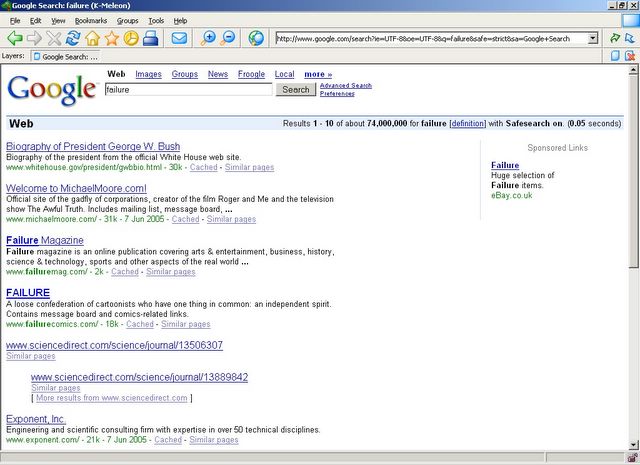
The screenshot says it all. I'll post the technical details in a bit. It shows how heavily a search engine relies on its algorithms, but they can often be exploited. 
Tuesday, June 07, 2005
Mozilla/Firefox Security Flaws
Secunia - Advisories - Mozilla / Mozilla Firefox Frame Injection Vulnerability
Another security hole has been found that exists in Mozilla-based browsers. Although not as serious as the bug that led to the 1.0.4 update, if a user clicks on a link on a specially-crafted website, the website could open a popup window that loaded the target website (ie. an online banking site) but allowed the exploiter's site to insert their own code into a frame on the target site. This means that it would be (in theory) possible to load an online banking site, but change the part that asks the user for their account details to code from another site. They would be entering their details into this other site, rather than their bank's. The address bar would still give the bank's address, and show the padlock symbol.
This flaw, when originally discovered (7 years ago!), existed in nearly all browsers, including Internet Explorer. Although they were all fixed at the time, recent modifications to Mozilla's code seem to have reopened the loophole.
In my opinion, after the initial report, the code should have been rewritten in a way that would prevent this sort of thing happening again.
Just to see it in action, follow the link to Secunia's site to see a demonstration.
Lots of people are being very negative about this new flaw, although to be fair, most of the IE code is way out of date, and IE 7 will not be available to non-XP users. I will discuss IE7 in a future post.
Other blogs:
Theme Wuhan
Sunday, June 05, 2005
My First Post
Hello, and welcome to my technology blog.
As you probably guessed from the title, this blog will discuss the latest news in the technology industry, on the internet, and also verging on the scientific.
I will try and post often, although, of course, I will not always be able to do so.
I will also try and talk about smaller issues that many others may have missed, but they are still important enough to know about.
You can see my other blogs by clicking the link to view my profile in the sidebar.
I already have some things I would like to talk to you about, and I will post them soon.
Matthew.
Subscribe to:
Posts (Atom)


